Posts

The Good, the Great, and the Mind-Blowing - CSTA 2018

If you've never been to the CSTA 2018 ( Computer Science Teachers Association ) conference before, you need to go to Phoenix, Arizona for their 20th anniversary conference next summer. This year's conference was held in Omaha, Nebraska, and was a huge success. With a record number of attendees (700), fabulous workshops, sessions, a vendor hall, and a field trip to the University of Nebraska, there were tons of opportunities to learn about CS, not only from presenters but from fellow attendees as well. The sessions were informative, the food was great, drinks were free (a couple), and the atmosphere of camaraderie made learners at all levels feel welcome and accepted.  My head is still swimming with all the great things I learned, but below is a summary of my three favorite sessions.

Fabulous FETC Finds - AR, VR, MR & AI

Image
In January, I had the amazing opportunity to travel to Orlando, Florida for FETC 2018 (Future of Education Technology Conference). Believe it or not, it was the first time I had ever attended! What I loved most about it was the number of tracks offered: Administrator, Information Technology, Educator, Special Education, and Early Learning. There truly was something there for everyone, and so many sessions that it literally took hours to choose a single day's worth of sessions. Though my intended focus was Computer Science, I found myself drawn in by some of the other offerings. Below are some of the amazing things I learned about the world of AR, VR, MR, and AI. I can't wait to find some time to dig in and learn more about some of these resources, products, and websites!

Augmented Reality - Breakout EDU mashup!

Image
This past weekend, my teammate Tiah Frankish  and I attended the GAFE Summit  put on by the EdTechTeam and hosted by Boulder Valley School District in Colorado. We learned a ton of new things, and were re-invigorated when we returned to work on Monday. Two of the sessions we went to were especially fun, a Breakout EDU building session lead by Crystal Miller and Sarah Stuhr and another one on Augmented Reality by Micah Shippee . Of course, our minds started spinning - how could we hide a clue to a lock for a Breakout activity in an augmented reality image? We decided to hide numbers in a Dodecahedron pattern that would only be revealed when viewed through the Quiver App . You can see the result below: Ha! I didn't even notice the Tech & Learning magazine underneath.

The Potential Danger of NO Digital Footprint

Image
"If a tree falls in a forest and no one is around to hear it, does it make a sound?" For years we've taught students about the importance of maintaining and protecting their digital footprints. We know that what we post online and what others post about us can have a lasting impact on our futures. People pass judgement about us based on what dirt they can dig up in a simple online search. The information unearthed can determine whether or not we get that scholarship, job, or date we are pursuing. But can the absence of a digital footprint have a negative impact as well? Is it also important to ensure that you actually have an online presence that supports the future you wish to build for yourself?

New Google Apps for Education Feature!

Image
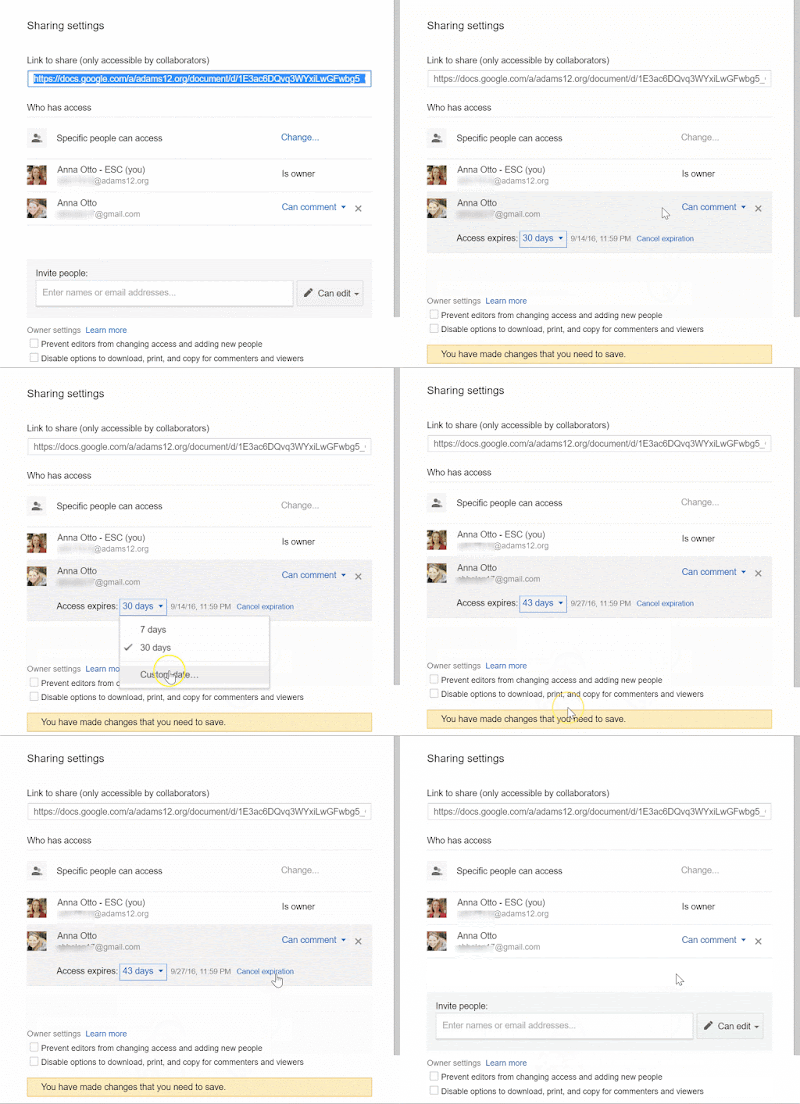
Part of my job is to maintain online professional development courses for teachers in our district. We have a Google Drive course that I must comb through periodically to make sure the video tutorials are current and reflect the latest Google Drive features and interfaces. In doing so, I discovered a new (to me) feature that may have escaped notice for you as well!

Five Fresh, Fun, and FREE Presentation Tools

Image
As you know, this summer (2016) ISTE will be releasing the newly revised standards for students . In the second draft of the standards, standard 1d calls for students to " experiment with emerging technologies, drawing on their knowledge of existing tools and operations, and demonstrate an agility in troubleshooting and solving technical problems." Although not yet finalized, it's a pretty safe bet that the final version of the standards will include some variant of this requirement. Although there are many ways to integrate technology, often presentation tools are used as a vehicle for formal or summative assessments and can be the easiest way for teachers to allow students to choose their own tool without direct instruction on how to use it. If you're looking for some new presentation tools for students to implement in lieu of Google Slides, Prezi, PowerPoint, etc., check out this list of five fresh, fun, and FREE presentation tools!

New Google Slides Features!

Image
Google just released a couple amazing upgrades to Slides that I'm quite jazzed about! The most noteable is a new integrated backchannel/audience participation tool they're calling "Q&A". Now, when you're presenting using Google Slides, you can display a short URL that audience members can access and submit questions while you're presenting. Audience members can see everyone's questions and vote up the questions they also want to hear answered!

Apple iPads Just Got School Friendly - Almost.

Image
For those of you who follow my blog, you may have noticed that I have not necessarily been the biggest fan of iPads in education. I know, I know, this is in stark contrast to seemingly 99.9% of others in my field, but let me explain. While the iPad is very kid friendly and has loads of great apps for kids, it has not been school friendly due to Apple's insistence that the iPad is a personal device and as such is optimized for 1:1 use. So much so, that trying to use iPads with multiple students sharing the same device in a school setting has been extremely cumbersome due to iCloud issues, app installation complications, and saved student work snafus. And while 1:1 implementation may sounds like a great solution to these issues, due to its price point, 1:1 implementation of iPads in schools is not realistic in most situations. Even district-wide 1:1 implementation of Chromebooks, which are significantly cheaper, has not been financially feasible where I work. So this is why I...

Random Fun

Image
Sometimes I learn about something new that doesn't really merit a full blog post. Read on for a list of a few of the random fun things I've come across lately!

Keyboarding & Online Testing

In our district, anxiety over CMAS and PARCC online testing has been steadily rising as the testing window approaches. Concerns over student tech skills hampering performance have continued to grow as teachers have increased the use of technology in their classrooms and realized that students' tech prowess may not be up to par. Back in March, I blogged about our department's work around determining the tech skills students will need to be successful on the CMAS & PARCC . Since then, an increasing number of teachers and principals have taken an especially hard look at their students' keyboarding abilities and realized that typing speed (or lack there of) may sabotage their kids' ability to show what they know on the state tests. 

The Student Guide to Writing Comments

Image
Communication and collaboration are important 21st century skills addressed by the ISTE Standards for Students : Students use digital media and environments to communicate and work collaboratively, including at a distance, to support individual learning and contribute to the learning of others. As Google Apps for Education, Google Classroom, and learning management systems continue to gain in popularity, students have more and more opportunities to work with others in an online environment, provide written feedback to their peers, and communicate digitally. This does not mean, however, that they all have the skills needed to do so productively and effectively. As a result, we decided to provide our teachers with a resource to help students write better comments. After scouring the Internet for ready made resources, we found a variety of good information, but nothing that met all our needs. So we compiled what we found to create the information below.

COPPA - Children's Online Privacy Protection Act

Image
As the school year ramps up, our department has been busy creating a training module on COPPA and protecting students online. This is a module that all teachers in our District will be taking this year (and likely every year going forward), thus denoting a significant shift in our District's messaging about tech integration and student safety. As part of this module, we created a short video using Adobe Voice that explains COPPA. (You can read more about Adobe Voice in my previous post.) Our goal was to help teachers understand COPPA without boring them with a lengthy written explanation. Hopefully, our little video is less dry than the alternatives.... Similar to other districts, ours has struggled in years past with finding a balance between protecting student privacy and empowering teachers to use professional judgement when selecting sites for instructional use and creating student accounts.  This year, the Responsible Use Agreement that is part of our Superintendent...

No Rest for the Techie...InnEdCo, Here We Come!

How do you like to spend your summers? Resting, rejuvenating, traveling, learning? Why not all of the above? Summer break for my team started on June 10th, but we're not ready to relax just yet! On Monday, three of us head to the mountains to present at the InnEdCo conference (formerly TIE Colorado). We will be leading a session called Exploring the Tech Integration - Blended Learning Continuum . Our session is based on our Blended Learning vs Tech Integration presentation that I blogged about in January. We are excited to have the opportunity to present and learn alongside so many great Colorado instructional tech leaders, including some teachers from our district. If you plan to attend the conference, I hope you'll come to our session! For those of you who don't live in Colorado or who are not attending, what are your favorite summer learning options?

Great New Presentation Tool for iPads: Adobe Voice

Image
Adobe recently released a free new iPad app called Adobe Voice . If you use iPads with your students or for yourself, you should check it out! It's an extremely simple and user friendly presentation tool that is great for teachers and students alike. It has several different combined background/transition options, but not an overwhelming amount and has a nice little music library divided by theme/mood. Users can use the available graphics, upload photos, or add text to one of a few different slide formats, record audio for each slide, and either use the provided music or upload their own. It even has a few pre-made story structures, such as "Teach a Lesson", "Show and Tell", and "Explain Something". It also has a built in tutorial that walks you through how things work the first time you use it. No need to spend time teaching students what to do! Best of all, it's so easy to use, even a Kindergartner could use it! The only real downside is ...

Instructional Tech QuickGuide to Integration

Image
In a recent post titled " Go Paperless ", I shared a Paperless PD QuickGuide our team created to help with meaningful tech integration in professional development. Since then, we've made a few adjustments to it and re-branded it as an Instructional Technology QuickGuide , designed to be a reference for teachers looking for ways to integrate technology. As with the original, this document is filled with links to sites and tutorials. Click on the image below to check it out! (*Note: Strange Google Behavior: For some people, the document is not opening without requesting Share permission, though it is set for all to view. If this happens to you, copy and paste the link into a new browser window, and you should be good to go.) We hope that teachers will find our QuickGuide helpful and easy to use. What do you use to inspire tech integration for yourself or others?

Schoology - Inspired by CommonCraft

One of our favorite resources when helping teachers understand technology is CommonCraft , a company that puts out a series of short videos that explain various tech concepts "in plain English". If you're not familiar with their videos and formats, below are a couple of great ones: Online Citizenship Web Search Strategies As part of a subscription, you get access to CommonCraft's cutout library so you can create your own CommonCraft-style videos. We used their cutouts to create a short introduction to Schoology , a learning management system that we recommend our teachers use to house resources and course content for their students. We shared this video in  a course we created to help our teachers learn how to use Schoology with their students. Although the Schoology website has a few videos of their own, the features described in their marketing videos include some of the Enterprise features, which are only available in the paid version of Schoology. At the ...

Go Paperless!

Image
Our team was recently called upon to teach members of our district's Learning Services department strategies for integrating technology into their professional development (PD) sessions. Knowing that our district would soon be flooded with Chromebooks to support online testing and that we had people with a variety of skill levels, we developed three versions of a Google training to help people think about ways they could use Google tools in their PD sessions to reduce paper and enhance engagement. Our hope is that if teachers experience the meaningful use of technology in the PD sessions they attend, they will be inspired to transfer some of the tools and strategies into their own teaching. As a companion to these sessions, we developed a Paperless PD QuickGuide for participants to reference as they plan their PD sessions.

Tech Skills Needed for Successful Online Testing

Image
With state testing going online, many teachers worry that their students will not do well due to a lack of tech skills rather than content knowledge. In our district, my department has been tasked with helping teachers determine what tech skills their students will need. We are also working hard to find tools that will help students practice these skills without requiring students to take online practice tests over and over. In Colorado, our students will be taking the CMAS and PARCC, both powered by PearsonAccess . We searched high and low for resources that may have already been created to help us with this task, but found few. So in an effort to help others, I am sharing our findings with you! UPDATE 1/12/15: I've updated some links and added a few additional resources that I've come across since originally posting this. UPDATE 2/12/16 : Some of the links and tools changed. New updates reflect these changes.

Flipping Fantastic!

Image
It's funny how information sometimes aligns. I read an article today in an issue of eSchool News that a colleague had sent to me titled, " Don't Make These Mistakes with Flipped Learning " by Meris Stansbury, and one part stuck with me: "teachers need to have an accountability system in place for flipped learning instead of just relying on students to watch the video with no checks-and-balances." The author gave a couple of examples, such as, "have them eMail answers to two-to-three questions after viewing the video materials and describe two questions that they have about the video or what they didn’t understand. Students should have this completed by a certain time of night." Such a simple and seemingly obvious idea, but many teachers skip this step. Then, the stars aligned and my boss sent me a link to a great FREE tool she came across today: e duCanon . eduCanon lets you embed multiple choice questions into the timeline of a video and coll...

Free iOS Apps for a Limited Time

In case you're interested, here's a few potentially interesting iOS apps that are currently FREE! (Descriptions are copied from descriptions in the app store.)  I have not vetted these, but they look promising.... Let us know if they are any good in the comments! littleBIG History (Usually $4.99)   - " A revolutionary interactive timeline that lets you explore world history on an unprecedented scale - from the first miliseconds after big bang to the present and beyond.  It places humanity in the large context of cosmos, earth and evolution of life." Wonderful Days - Diary with Style (Usually $2.99)   - " An ideal app for diary, journal, and note-taking. It is polished with a lot of customization options, including themes, photo frames, fonts, and icons. You can effortlessly keep track of your wonderful moments everyday, and enjoy them in exciting ways." Prompts - For Writers (Usually $2.99)   - "Get more than 1,000 starting lines and creati...