Posts

iOS 7 Tips & Tricks

If you've updated to the new iOS 7 on your iDevice, you know that it looks and feels quite a bit different! If you're having trouble navigating the new iOS or if you're looking for general tips and tricks, check out the presentation I've updated for our district's iPad/iPod Basics course!

Free Apps All Month!!

Image
It's hard to believe that March is already here! Did you know it's National Reading Month? To celebrate, Auryn, Inc . is giving away a free interactive reading iPad/iPhone app each day of March! Today's interactive book is by Dean Koontz . It not only reads to you "karaoke style", highlighting each word as it goes along, but also lets you record your own narration, write your own text, color in the pictures, and much more! Take advantage of this amazing promotion and download each free book daily! Be sure to get the full version, not the Lite one. This will be great for your primary classroom or your own children! I am downloading them myself even though my little munchkin is still 8 weeks away from being born. :) Check out the free book schedule below and don't miss out!

Get Organized!

Image
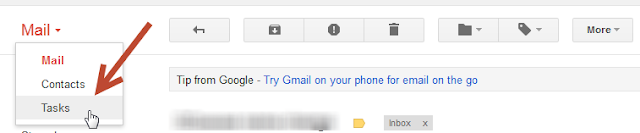
For as long as I can remember, I've kept track of things I need to do with paper lists or sticky notes. Although this suited me fine for many years, when I started working as a Tech Trainer and now an Instructional Tech Coordinator, I found my system to be inadequate, to put it kindly. Now I am constantly on the go; I'm no longer tethered to a single room. I'm running from school to school to work with teachers, principals, and other administrators on a variety of projects. Not only did my to-do list/stickies not travel with me, the little scraps of paper that I jotted notes onto while away from my desk often got lost, or went through the wash in my back pocket. Not ideal. (Not to mention it's embarrassing for someone who is supposed to be a tech leader to keep track of tasks that way!!) I then discovered the Tasks feature in Google.

Happy Digital Learning Day!

Image
In honor of Digital Learning Day, our department ( Instructional Technology and Library Services  in Adams 12 Five Star Schools ) launched new online technology courses for teachers in our district and created a poster explaining digital literacy to display in our schools. Click here to access the PDF version of this poster. Feel free to print it for use in your district/school, but please do not change the poster in any way and leave our Adams 12 logo on it. How are you celebrating Digital Learning Day?

Considerations for Purchasing Technology

Image
As one of the Instructional Technology Coordinators for Adams 12 Five Star Schools , I am frequently called upon by principals to assist with technology purchasing decisions. Often it seems that people are hoping to hear of one tool that is the "magic bullet" for all tech integration purposes, but alas, no such device exists. My goal during these meetings is to help buildings determine not only what technology to purchase but also help focus their instructional purpose for the technology. As a result of these meetings, I've found that there are common themes and considerations that surface each time. To help with the process and to highlight these themes, I recently wrote an article for the Adams12 Learning Services Newsletter , which you can read below:

Using iPads in the Classroom

Image
Well, it's been a while since my last post, but in my defense, I've started a new job...and created a new life! I'm pregnant! Very exciting, but the two combined keep me busy and exhausted! That said, I wanted to share some of my new discoveries around the use of iPads in the classroom. There's little doubt that instructional technology can transform learning. The tablet (iPad) is a powerful tool that allows students to access the Internet as well as use apps to support their learning. Ideally, the iPad should be used for more than just skill & drill. That’s not to say that you should never use it for this purpose, however this should not be the primary function of the iPad. iPads should be used to create, collaborate, research, differentiate, and explore! Avoid activities that could be easily done without an iPad; take full advantage of its power! Now, as those of you who have read my previous blog posts know, I started out as an iPad cynic . I started to co...

Infographics

Image
#edchat #edtech #vitalcpd I recently decided to get creative with my resume and turn it into an infographic .  While putting it together, it occurred to me that it could be fun to have students create their own version of an infographic resume at the beginning of the year to share information about themselves with the class as a cool new ice breaker or get-to-know-you activity. You could also assess students by having them put together infographics on whatever topic they’ve been studying! There are lots of great, free tools online that can help students create their infographics, and they can use software on the computer as well. In fact, after experimenting with creating an infographic online, I decided to put mine together using MS Publisher just because it gave me the freedom I needed to make things look the way I wanted.  If you’re interested in creating infographics, check out some of these great online resources:    (Of course, as always, be sure t...