Posts

Showing posts with the label google

Instructional Tech QuickGuide to Integration

Image
In a recent post titled " Go Paperless ", I shared a Paperless PD QuickGuide our team created to help with meaningful tech integration in professional development. Since then, we've made a few adjustments to it and re-branded it as an Instructional Technology QuickGuide , designed to be a reference for teachers looking for ways to integrate technology. As with the original, this document is filled with links to sites and tutorials. Click on the image below to check it out! (*Note: Strange Google Behavior: For some people, the document is not opening without requesting Share permission, though it is set for all to view. If this happens to you, copy and paste the link into a new browser window, and you should be good to go.) We hope that teachers will find our QuickGuide helpful and easy to use. What do you use to inspire tech integration for yourself or others?

Go Paperless!

Image
Our team was recently called upon to teach members of our district's Learning Services department strategies for integrating technology into their professional development (PD) sessions. Knowing that our district would soon be flooded with Chromebooks to support online testing and that we had people with a variety of skill levels, we developed three versions of a Google training to help people think about ways they could use Google tools in their PD sessions to reduce paper and enhance engagement. Our hope is that if teachers experience the meaningful use of technology in the PD sessions they attend, they will be inspired to transfer some of the tools and strategies into their own teaching. As a companion to these sessions, we developed a Paperless PD QuickGuide for participants to reference as they plan their PD sessions.

Get Organized!

Image
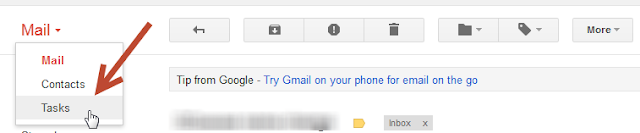
For as long as I can remember, I've kept track of things I need to do with paper lists or sticky notes. Although this suited me fine for many years, when I started working as a Tech Trainer and now an Instructional Tech Coordinator, I found my system to be inadequate, to put it kindly. Now I am constantly on the go; I'm no longer tethered to a single room. I'm running from school to school to work with teachers, principals, and other administrators on a variety of projects. Not only did my to-do list/stickies not travel with me, the little scraps of paper that I jotted notes onto while away from my desk often got lost, or went through the wash in my back pocket. Not ideal. (Not to mention it's embarrassing for someone who is supposed to be a tech leader to keep track of tasks that way!!) I then discovered the Tasks feature in Google.

Droid Apps for Education

Image
This past weekend, after months of research and waiting, I bought myself a new cell phone--though "cell phone" is really quite the understatement. This is really a handheld playground that happens to also be a phone. I have been with Verizon since I first owned a cell phone and was debating between their Droid Incredible, or switching to AT&T and getting the iPhone. I have a phenomenal old plan with Verizon and their reception in my area is far superior to AT&Ts, but I couldn't help but drool over the iPhone. However, after much research and talking to people who have owned both phones, I decided to stick with my carrier and get the Droid. Boy, am I happy! So far, this phone is amazing. It's extremely user friendly and there are tons of great free apps online. Two of my favorites that have educational uses are Google Skymaps and Trippo Mondo by Cellictica.