Posts

Flipping Fantastic!

Image
It's funny how information sometimes aligns. I read an article today in an issue of eSchool News that a colleague had sent to me titled, " Don't Make These Mistakes with Flipped Learning " by Meris Stansbury, and one part stuck with me: "teachers need to have an accountability system in place for flipped learning instead of just relying on students to watch the video with no checks-and-balances." The author gave a couple of examples, such as, "have them eMail answers to two-to-three questions after viewing the video materials and describe two questions that they have about the video or what they didn’t understand. Students should have this completed by a certain time of night." Such a simple and seemingly obvious idea, but many teachers skip this step. Then, the stars aligned and my boss sent me a link to a great FREE tool she came across today: e duCanon . eduCanon lets you embed multiple choice questions into the timeline of a video and coll...

Free iOS Apps for a Limited Time

In case you're interested, here's a few potentially interesting iOS apps that are currently FREE! (Descriptions are copied from descriptions in the app store.)  I have not vetted these, but they look promising.... Let us know if they are any good in the comments! littleBIG History (Usually $4.99)   - " A revolutionary interactive timeline that lets you explore world history on an unprecedented scale - from the first miliseconds after big bang to the present and beyond.  It places humanity in the large context of cosmos, earth and evolution of life." Wonderful Days - Diary with Style (Usually $2.99)   - " An ideal app for diary, journal, and note-taking. It is polished with a lot of customization options, including themes, photo frames, fonts, and icons. You can effortlessly keep track of your wonderful moments everyday, and enjoy them in exciting ways." Prompts - For Writers (Usually $2.99)   - "Get more than 1,000 starting lines and creati...

Blended Learning vs. Tech Integration

Image
Like many others, my department has been drawn to blended learning and the personalized learning it allows. Both this year and last year, we worked with a small group of teachers in our district to help them implement blended learning pedagogy in the classroom. We've had much success, but make no mistake, transforming teaching to provide students with a blended learning experience is no small task. One of our favorite articles on the topic, The Basics of Blended Instruction , by Catlin R, Tucker, provides some great tips for teachers looking to pursue blended learning. One thing we observed in working with teachers is that it's extremely difficult to wrap your head around the difference between tech integration and blended learning. Truth be told, we were probably a bit fuzzy on it ourselves for quite some time! In order to help explain the difference, we created a graphic based on Dr. Ruben R. Puentedura's SAMR Model .   Because we receive numerous requests f...

iOS 7 Tips & Tricks

If you've updated to the new iOS 7 on your iDevice, you know that it looks and feels quite a bit different! If you're having trouble navigating the new iOS or if you're looking for general tips and tricks, check out the presentation I've updated for our district's iPad/iPod Basics course!

Free Apps All Month!!

Image
It's hard to believe that March is already here! Did you know it's National Reading Month? To celebrate, Auryn, Inc . is giving away a free interactive reading iPad/iPhone app each day of March! Today's interactive book is by Dean Koontz . It not only reads to you "karaoke style", highlighting each word as it goes along, but also lets you record your own narration, write your own text, color in the pictures, and much more! Take advantage of this amazing promotion and download each free book daily! Be sure to get the full version, not the Lite one. This will be great for your primary classroom or your own children! I am downloading them myself even though my little munchkin is still 8 weeks away from being born. :) Check out the free book schedule below and don't miss out!

Get Organized!

Image
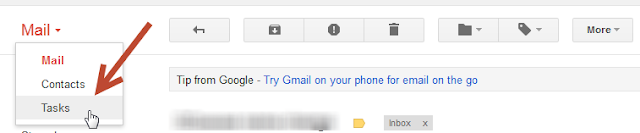
For as long as I can remember, I've kept track of things I need to do with paper lists or sticky notes. Although this suited me fine for many years, when I started working as a Tech Trainer and now an Instructional Tech Coordinator, I found my system to be inadequate, to put it kindly. Now I am constantly on the go; I'm no longer tethered to a single room. I'm running from school to school to work with teachers, principals, and other administrators on a variety of projects. Not only did my to-do list/stickies not travel with me, the little scraps of paper that I jotted notes onto while away from my desk often got lost, or went through the wash in my back pocket. Not ideal. (Not to mention it's embarrassing for someone who is supposed to be a tech leader to keep track of tasks that way!!) I then discovered the Tasks feature in Google.

Happy Digital Learning Day!

Image
In honor of Digital Learning Day, our department ( Instructional Technology and Library Services  in Adams 12 Five Star Schools ) launched new online technology courses for teachers in our district and created a poster explaining digital literacy to display in our schools. Click here to access the PDF version of this poster. Feel free to print it for use in your district/school, but please do not change the poster in any way and leave our Adams 12 logo on it. How are you celebrating Digital Learning Day?